

Flight Clave23+ Operation Guide
Proper installation, operation and maintenance are the most important things to know in terms of autoclave ownership. Improper installation can lead to the machine not functioning properly. Improper operation can lead to complications with sterilization. And neglecting maintenance will ensure that your sterilizer will malfunction and cause long term damage.
But here at Sterilizer Autoclave Solutions, we make it our job to provide you with the proper knowledge to make sure everything goes smoothly for every phase of the process. In this article, we’d like to focus on the operation guide for one autoclave in particular. We’ll be going over the operation instructions for the Flight Clave23+, with instructions provided by the manufacturer. With proper operation, you can ensure that your sterilization cycles are completed to standard, and your autoclave doesn’t run into issues along the way.
If you’d like to read the Installation Guide for the Flight Clave23+, you can find it here.
If you have any questions about the Flight Clave23+ autoclave or anything else, please give us a call at 704-966-1650 Option 3 for our Free Tech Support line.
Operation Guide
Prerequisites
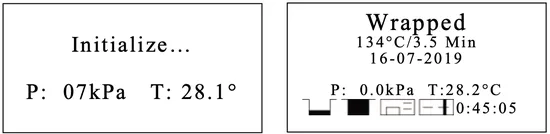
Switch On.
Check the status of the icons in the screen.
**THE DOOR MUST BE OPEN PRIOR TO TURNING ON THE POWER TO ALLOWING THE UNIT TO CALIBRATE**
 Load
Load
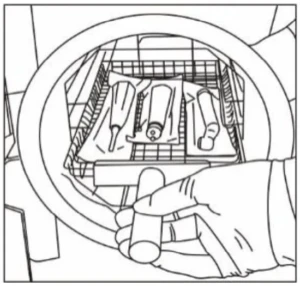
Open the door then placed the trays inside the chamber by the tray handle.
After the instruments are loaded, you may close the door.
Select the program
Enter to the main menu by pressing the menu button, Select “Program”. Select the program by pressing the up and down arrows, then press the menu button to confirm program, in the screen will appear the information of selected program as the temperature and sterilization time (holding time), also the date, time, current pressure and current temperature.

Start the sterilization program
Press the enter button to start the cycle. The stage, conditions and the status of the cycle will appear on the display. The sterilizer will perform the program automatically.
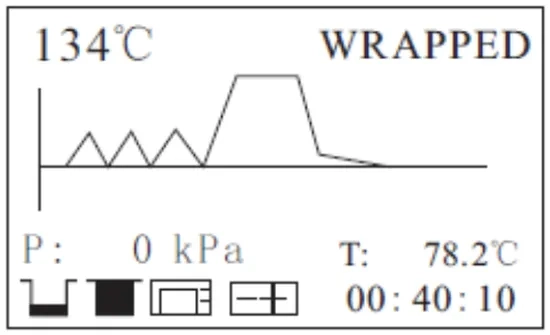
Total time or count down until completion.
End of the Cycle
Once the cycle is completed, “End” will appear at the end of the graphic. The printer will print out and the digital report is saved in the USB memory if these are connected.
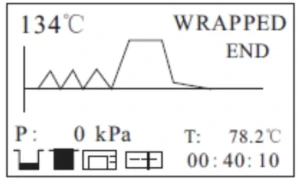
Caution: Always use the tray handle to load or unload the tray into the sterilizer. Failure to do so can result in burns.
Manual Interruption of the Cycle
To interrupt a cycle prematurely, hold the enter button for 3 seconds.
If the cycle is manually interrupted after it reaches the drying phase, the items inside the sterilizer may be considered sterile and since the cycle has been interrupted during the drying phase the materials and instruments inside the chamber may be wet.
Note: If the cycle is manually interrupted before it reaches the drying phase, the items inside the sterilizer must be considered not sterile. N20 will appear on the screen. (see Error code description).
Caution: Caution: Depending which phase of the cycle you interrupt the cycle, steam and water can escape from the sterilization chamber when you open the door.
Data
The internal memory will store the information of the last 9999 cycles.
USB Flash memory (Optional)
A USB drive can be used as a method of storing a report of the cycle. To do so, insert the USB drive into the slot located on the service door of the sterilizer.
The information will automatically output directly to the USB drive after the cycle has completed. The name of the file is determined by the serial number of the machine and the cycle number.
For example:
The serial number is E00001. The cycle number is 0012.
The file name in the USB stick is 01001200.txt.
The first two numbers represent machine number.
The middle four numbers represent cycle number.
The last two numbers represent error code.
E.g. 00:no error; 01: error E01
Printer (Optional)
If installed, you can see the icon in the screen stop flashing.
At the end of each cycle the printer will print out a report of the cycle.
Note: If there is no paper inside the printer, the icon will flash.
Report
Internal Memory
In this menu you can get the information of all the cycles stored in the internal memory of the sterilizer.
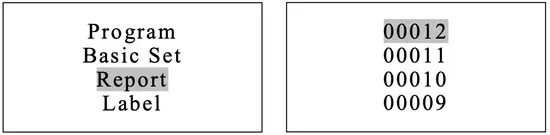
Select “Report” from the main menu and press the menu button, you will see the list of records.
Select the record by pressing the up and down arrow buttons.
Press the menu button button to print and save the report.
Press the enter button to exit.
Sample of a Printer Report
When reading the printed data records, refer to the diagram below:

Print Labels
Select “Label” from the main menu and press the menu button to enter the menu.
Select the cycle number by pressing the menu button.
Choose the labels quantity by pressing the up and down arrows then pressing the menu button to print.
Press the enter button to exit.

As always if you have any questions about this process or anything else please feel free to contact us and take advantage of our “FREE TECH SUPPORT.”
We also offer FREE VIRTUAL TECH SUPPORT to “See and Talk” with a “Real Time Live Technician” for any problems you may be in need of help with.
You can also use our “FREE MAINTENANCE PROGRAM”. Take the guesswork and worrying about what unit is due for maintenance and which maintenance cycle it is time for. We will keep track of all your autoclaves and let you know when it’s time for anything.