

W&H Primea Handpiece Operation Guide
Equipping your practice with W&H handpieces means you’re getting powerful, yet lightweight, high-speed technology designed for reliable daily use. The hard work and precise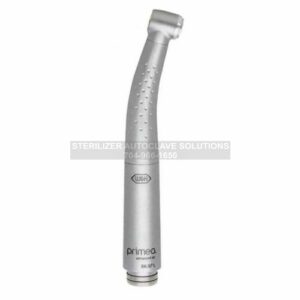 engineering put into each handpiece help to provide a unique experience curated by W&H. However, that experience can be soured quite easily when the instructions for proper operation aren’t being followed.
So to help ensure that you’re getting the most out of your tools, we’re going to look at the operation instructions for your W&H Handpieces. Specifically, this blog will cover the operation guide for the W&H Primea Handpiece Line. The W&H Primea handpieces consist of the RK-97 L and RG-97 L.
If you have any questions about the W&H Primea handpieces or any other information on our selection of dental instruments, give us a call at 704-966-1650 Option 3 for our Free Tech Support Line.
Operation Guide
Assembly Removal
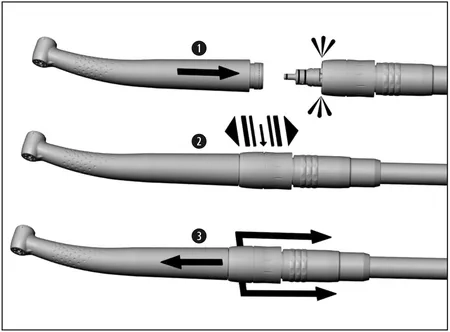
Do not assemble or remove the medical device during operation!
1.) Push the medical device onto the Roto Quick coupling.
2.) Verify full engagement.
or
3.) Pull the retention sleeve of the Roto Quick coupling back and remove the medical device by pulling in an axial direction.
Rotary Instruments
> Use only rotary instruments which are in perfect condition. Follow the operating instructions of the manufacturer.
> Insert the rotary instrument only when medical device is stationary.
> Never touch the rotary instrument while it is still rotating.
> Do not activate the push-button of the medical device during operation. This leads to detachment of the rotary instrument, damage to the chucking system and/or heating up of the medical device. Risk of burning!
> Only use rotary instruments up to the maximum operating speed stipulated by the manufacturer.
Operation Without W&H Control Unit
The functions of the medical device are limited, if it is not operated with a W&H control unit!
> no speed control
> no light
To Change Rotary Instrument
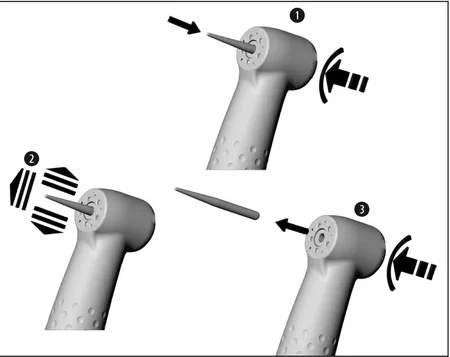
1.) Insert the rotary instrument. Activate push-button, at the same time insert the rotary instrument until back stop.
2.) Verify full engagement.
or
3.) Remove the rotary instrument by pushing the push-button.
Test Run
Do not hold the medical device at eye level!
> Insert the rotary instrument.
> Operate the medical device.
In the event of operating malfunctions (e.g. vibrations, unusual noise, overheating, coolant failure or leakage) stop the medical device immediately and contact an authorized W&H service partner.
As always if you have any questions about this process or anything else please feel free to contact us and take advantage of our “FREE TECH SUPPORT.”
We also offer FREE VIRTUAL TECH SUPPORT to “See and Talk” with a “Real Time Live Technician” for any problems you may be in need of help with.
You can also use our “FREE MAINTENANCE PROGRAM”. Take the guesswork and worrying about what unit is due for maintenance and which maintenance cycle it is time for. We will keep track of all your autoclaves and let you know when it’s time for anything.
You can find more information on the W&H Primea Handpieces on our site here.