

SciCan StatPure Operation Guide
We mention the importance of following the instructions properly for your autoclaves… But that’s also true for every device in your practice, even your water filtration system.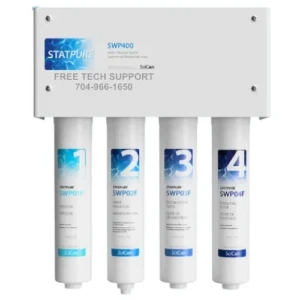 Proper installation, mounting and connections to your existing system. Operating the system properly day in and day out. Even proper maintenance to ensure its longevity and water quality. It’s all just as important here than ever.
We’ve written an article on the installation instructions for the SciCan StatPure. So in this article, we’re going to be covering the operation guide. With proper instructions for daily operation that come directly from the manufacturers. That way, you know your way around your SciCan StatPure, to deliver distilled quality water to your practice every day.
But if you have any questions about the StatPure, water filtration systems, or anything else, please give us a call at 704-966-1650 and we’ll help you find what you need.
System Startup
After installation:
1. Turn on the cold water supply.
2. Open the angle stop valve (or alternative fitting used).
3. Allow the system to operate and fill for 10 minutes while checking for leaks.
4. The permeate pump should produce an audible clicking sound, indicating water production.
5. Allow the system to operate for at least 30 minutes total.
6. Open the faucet to release trapped air.
7. Close the faucet once water flows steadily.
8. Activate the autoclave fill wand briefly to remove air.
9. Proceed with tank and faucet sanitizing procedure (see Section 13).
10. The system should run 1–2 hours prior to first use to allow the storage tank to fill completely.
Daily Operation
Water flows through the system as follows:
Supply water (city) > Prefilter (#1) > Hyperfiltration (#2)
From there:
› Treated water flows to the storage tank
› Wastewater flows to the drain
When water is dispensed to the faucet:
Tank > Polishing Filter (#4) > Faucet
When water is dispensed to the autoclave fill wand:
Tank > Deionization Filter (#3) > Wand
Produces deionized, also referred to as demineralized, water that is distilled quality.
The system automatically begins producing new purified water whenever water is used.
Monitoring Water Quality (TDS)
Total Dissolved Solids (TDS) measures all dissolved substances in water.
Typical municipal water: 150–300 ppm
Recommended water quality:
Autoclaves (deionized water) – TDS Range: 0-4 ppm
Bottle filling / Final rinse (RO water) – TDS Range: ~10 ppm
Ultrasonic cleaners – TDS Range: 10 – 50 ppm
Using the TDS Meters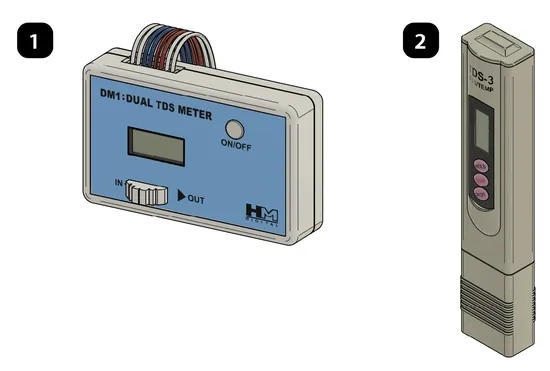
STATPURE includes:
› System-mounted dual TDS meter (1)
› Handheld TDS meter (2)
System-Mounted Meter
1. Lock faucet open.
2. Discharge autoclave fill wand for 5–10 seconds.
3. Once the pump clicks, read the meter.
Position:
IN – Measurement: TDS after Hyperfiltration (#2)
OUT – Measurement: TDS after Deionization (#3)
4. Turn the faucet off (closed position) once TDS meter measurements have been recorded.
Handheld Meter
1. Fill a cup with sample water.
2. Remove meter cap.
3. Turn meter on.
4. Submerge probe.
5. Record reading.
Both meters use: Two LR44 (1.5V) batteries
Interpreting TDS Readings
Example:
Stage and Reading:
City Supply Water 200 ppm
After Hyperfiltration 10 ppm
After Deionization 0 ppm
The Hyperfiltration should remove ~95% of TDS.
Remember, the above table is only an example. The reading on the “IN” should generally be about 5% or less of the inbound city supply water TDS. The Deionization filters remove the balance remaining to achieve the 0-4 ppm TDS level.
As always if you have any questions about this process or anything else please feel free to contact us and take advantage of our “FREE TECH SUPPORT.”
We also offer FREE VIRTUAL TECH SUPPORT to “See and Talk” with a “Real Time Live Technician” for any problems you may be in need of help with.
You can also use our “FREE MAINTENANCE PROGRAM”. Take the guesswork and worrying about what unit is due for maintenance and which maintenance cycle it is time for. We will keep track of all your autoclaves and let you know when it’s time for anything.
You can find more info on the SciCan StatPure on our website here.