

Flight A12 Operatory Installation Guide
Proper installation, operation and maintenance are the most important things to know in terms of ownership of any device or instrument. Believe it or not, that even extends to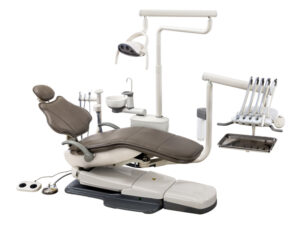 some of the biggest machines, like your dental operatory. Proper installation is vital to ensure that your machine starts its work without issue. Following proper operation will ensure that no complications arise during its use. And remembering proper maintenance can not only help your machines run smoothly… But it also helps to ensure longevity in your units. And when it comes to a dental operatory, a massive financial investment, you want to keep it in top shape.
But here at Sterilizer Autoclave Solutions, we make it our job to provide you with the proper knowledge to make sure everything goes smoothly for every phase of the process. We’ve written about the Flight Dental Systems A12 Operatory. You can find the original article on our site here. But in this article, we’d like to focus on the proper instructions for installation with this dental operatory. We’ll be going over the installation instructions for the A12 Operatory with instructions provided by the manufacturer. That way, you can ensure that your installation is up to snuff and prevent any issues down the line.
If you have any questions about the Flight Dental A12 Operatory, or anything else, please give us a call at 704-966-1650 Option 3 for our Free Tech Support line.
Tools Required for Installation
1. Allen (Hex) keys sets (Metric and Imperial)
4. Phillips screw driver – medium size
3. Slot head screw driver – medium size
4. Slot head screw driver – extra small size
5. Fish tape
6. Needle nose pliers – medium size
7. Moving dolly with pull rope
8. 10” Magnetic level
9. Standard pliers or cutters
10. Hammer drill
11. Utility knife
12. Handpiece pressure gauge
Hierarchy of Accessories
Stage 1 – Base
- Patient chair (may include chair foot control)
Stage 2 – Requires chair for installation
- Utility center with floor box
Stage 3 – Requires chair and utility center for installation
- Cuspidor
- Assistant utilities
- Doctor’s element with flex arm
- Operating light
Stage 4 – Require a stage 3 item
- Monitor mount requires a unit mount light post
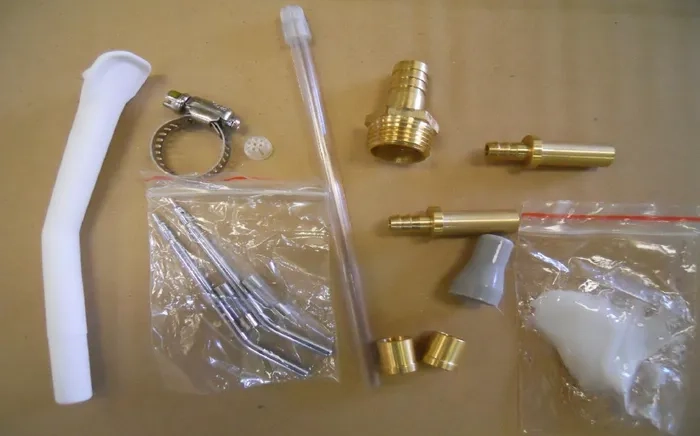
Parts Included:
1) 3/8 Compression fitting- 2pieces
2) Compression nuts – 2 pieces
3) Ring clamp – 1piece
4) 3-way syringe tip – 2pieces
5) Spare fuses – 2 pieces
6) HVE tip – 1 piece
7) SE tip – 1 piece
8) SE rubber attachment – 1 piece
9) SE plastic filter – 1piece
10) Lubrication- 1 bag
Basic Installation
This is a systematic overview with diagrams to help you quickly install the dental unit for operation. A two man team can install any Flight Dental Systems operatory unit in as little as one hour; however, it is preferred to have a minimum of three technicians in attendance for installation because of the weight of the equipment.
Flight Dental Systems A12H operatory system is shipped fully assembled with the exception of upholstery and treatment light, which must be installed in the operating room. In most cases the chair can be unpacked by loading it on a shipping dolly and wheeling it into the operating room for final placement and connection to the plumbing and electrical fixtures.
In certain cases, because of narrow doors or hallways, the cuspidor and delivery system must be removed from the chair to allow the chair to fit through the door; the cuspidor and delivery system can then be transported by dolly to the operating room for reassembly. Please note the overall dimensions of the chair and the delivery system relative to the dimensions of the door and the hallway prior to the transportation of the package into the operating room.
Unpacking
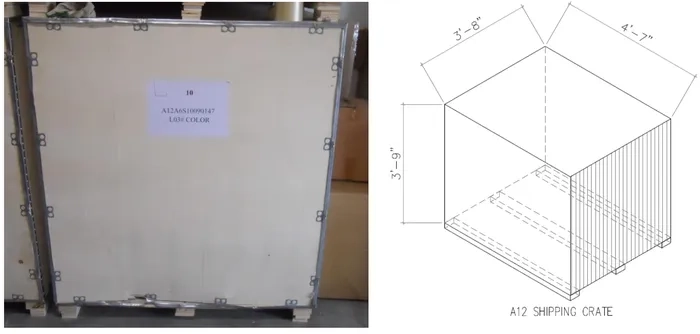
Open the wooden shipping crate in a large open area within the dental office or immediately outside the dental office if weather permits or if the office entry doors do not allow the shipping crate to be moved inside.
Installation of the Chair Foot Control
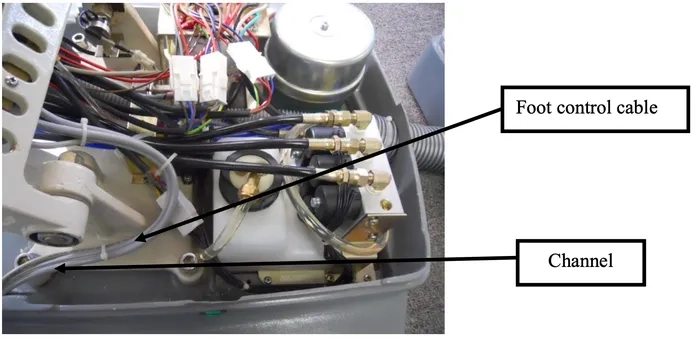
The chair will normally arrive with the foot control connected to the control box. If this is not the case you will need to install the foot control cable and insert the connector into the foot control plug on the control box.
Remove the base cover from the chair. This will require the removal of two screws located at the rear of this cover. When the cover is removed you will be able to place the foot control cable in the channel as indicated in the figure below. Insert the connector into the foot control plug on the control panel. The plugs will be clearly marked. In some cases it may be necessary to unscrew the mounting bracket upon which the control box is located in order to access the plugs on the control box.
Positioning of Chair in Operating Room
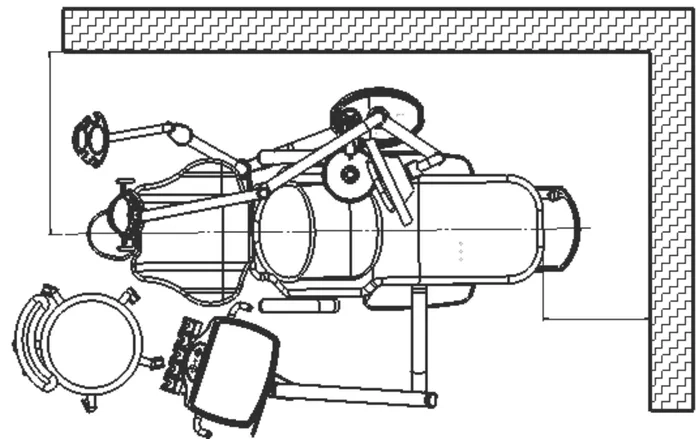
Proper operation of the dental unit requires that sufficient space be left around the chair to accommodate the operator and assistant as well as entry and exit for the patient.
We suggest the unit should be arranged in the following manner according to the figure below.
Installation of the Junction Box
We suggest that the unit be arranged according to the following sketch:
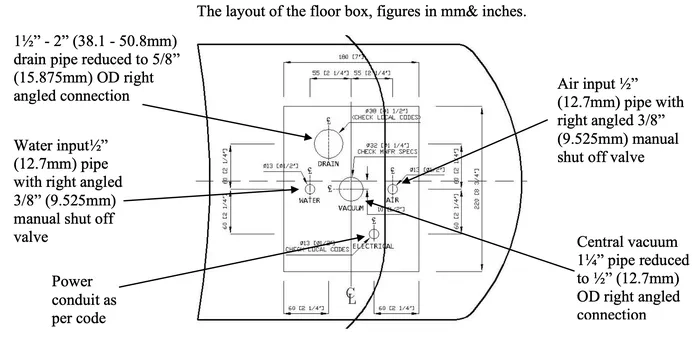
A)Water (air input:½”(12.7mm)pipe to a right angled 3/8”(9.525mm)manual shut off valve)
B) Vacuum 1¼” pipe reduced to ½” (12.7mm) OD right angled connection
C)Air (water input:½”(12.77mm)pipe to a right angled 3/8” (9.525mm)manual shut off valve)
D) Drain 1½” – 2” pipe reduced to 5/8” (15.875mm) OD right angled connection
E) Electrical power AC 110/220V, 50/60 Hz
i. The dimension of floor box: 9.85” X 9.85” (25cm×25cm)
ii.The height of air input, water input, and drain tubing is 0.984”- 1.18” (2.5-3cm)
Junction Box Positioning
The Flight Dental System normally requires the provision of a compressed air line, vacuum line, a water supply, a 1½” or 2” (50.8mm) drain and a 110/220V electrical supply. The necessary connectors will be found in a plastic bag stored within the floor box. A backflow prevention device must be installed at connection point of unit to office plumbing or elsewhere in the office in accordance with all federal, state, provincial and local regulations.
Junction Box Utility Connections Specifications
AIR:
• ½” (12.7mm) pipe protruding 1” from floor or wall. Supplied by contractor.
• Manual air shut-off valve to be installed by contractor.
• Air pressure 70-80 psi.
• Air plumbing should be flushed clean before making final connections to dental equipment.
WATER:
77½” (12.7mm) pipe protruding 1” from floor to wall. Supplied by contractor.
• Manual water shut-off valve to be installed by contractor.
• Water pressure 35-40 psi.
• Water plumbing should be flushed clean before making final connections to dental equipment.
ELECTRICAL:
• ½” (12.7mm) conduit (or by code) and box with dual or equal receptacle supplied by contractor.
• Wire box as per code with top of the box no higher than 4½” above finished floor.
• Voltage: 115 Volts AC 3 wire (for 115v system) or 230 Volts AC 3 wire (for 230v system).
CENTRAL VACUUM:
• Plumbing up to utility center should be specified by central vacuum supplier (usually 1¼”) and terminated in utility center with ½” (12.7mm) OD connection perpendicular to floor, similar to drain connection.
GRAVITY DRAIN:
• 5/8” (15.875mm) OD tube protruding 1” from finished floor. A 1½”– 2” (38.1mm – 50.8mm) pipe is recommended underground.
Note: Place trap in line and use vented fitting to conform to local codes. Supplied by contractor. Floor mounting only.
• Local regulations may require that licensed plumbers and electricians install utilities.
• Make sure all plumbing conforms to prevailing local codes.
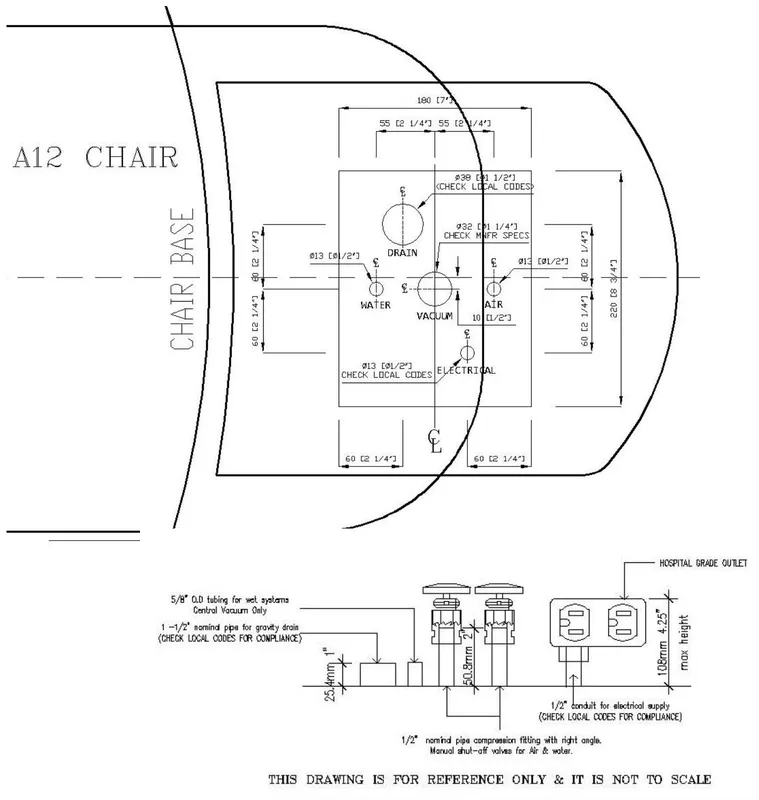
Use the junction box template to determine floor locations for connections.
Installing the Floor (Junction) Box
The floor box will be delivered connected by umbilical to the utility center. Be careful when moving the unit to avoid pinching the umbilical or any of the tubing within.
The floor box may be flush mounted or non-flush mounted depending upon the position of the utilities in relation to the desired chair position. The floor box may also be installed flush to the floor or resting on four rubber feet. If the floor box is installed using the rubber feet, the box will not be secured to the floor. If the floor box is to be mounted flush to the floor, you must remove the four rubber feet, and secure the floor box to the floor using four screws inserted through the holes previously occupied by the rubber feet.
Floor Box Installation
1. Prior to installing the utilities it will be necessary to flush out the office plumbing. Connect a hose to the water line and flush into a drain or suitable container. This will prevent debris getting into unit lines. Ensure to flush the air line as well.
2. Locate the junction box template for general layout. If the box is to be secured to the floor, drill holes into the floor and place the junction box frame over the office plumbing. Secure frame to the floor.
3. Install the master shut-off valves. Using a 5/8” (15.875mm) wrench, install the air and water shut-off blocks onto the master valves. Tighten the compression nuts securely.
4. If necessary, shorten drain and vacuum tubing as required.
5 .Locate the air and water regulators in packaging. The incoming air and water pressures may be set using these regulators. The air pressure regulators are manufactured to handle air and water pressures that do not exceed 135 psi.
The Floor Box Dimensions and Plumbing
To remove the floor box cover, just grasp the end of the cover and lift it upwards. This does not require tools. On certain models in which pressure gauges are visible on the outside of the floor box cover, be careful that you do not disconnect or damage the tubings that are connected to the cover. Air and water pressure pre-regulators control the air and water pressure of the unit.
The air and water shutoff valves control the flow of air and water to the unit. These valves must remain fully opened (turned clockwise) to prevent leaks. Only close the valves during servicing.
The air and water filter prevents solids from entering the unit.
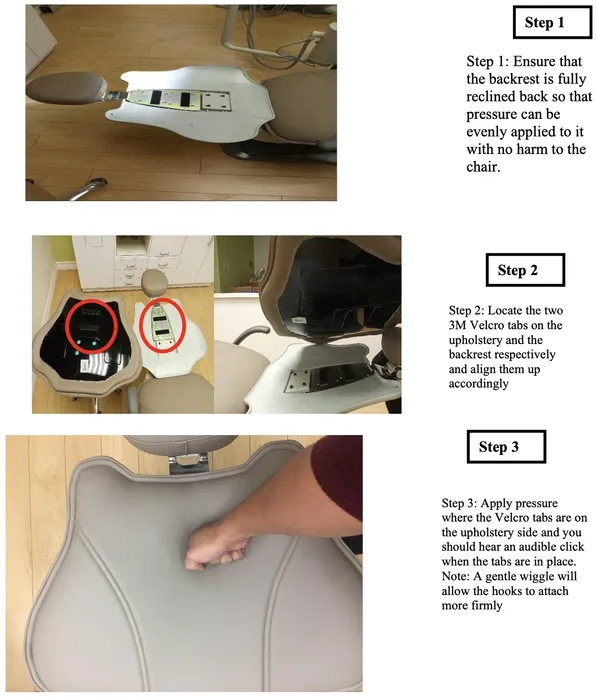
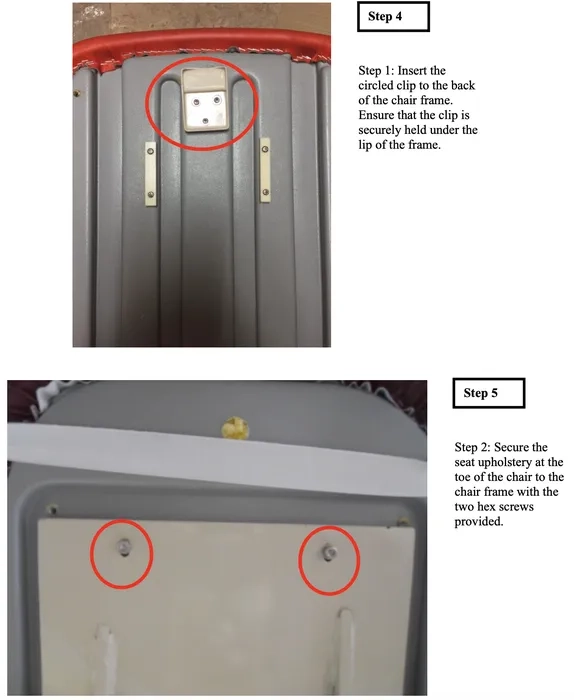
Installing the A12 Upholstery (Backrest and Seat Cushion)
Final Installation Inspection
Light
• Bulb tested and working properly
• Light arm swings freely and tension adjusted to prevent drifting
• Light switches and touchpad controls operating properly
• Test dual intensity settings
• Automatic on/off switch works when light is moved into/from working position
• Light focus is adjusted to customer’s preferences
Clean Up
• All surfaces have been wiped clean of dust, oil or any type of soiling
• Packaging has been removed from customer’s office
• Operatory room has been swept and counters cleaned of any materials used in installation
Training
• Customer has been trained in the operation of the operatory light.
Parts checklist:
• 2 boxes:
• 1 Treatment light head
• 1 Treatment light curved post and flex arm
• 1 User’s guide
Optional Features:
Ceiling Mount
Dual Track Light
Single Track Light
Unit Mounted Lights
Flight Torch LED Light: LL-305F Connection Instructions
Ensure that the wiring is connected properly on the lights.
Connecting light head wiring:
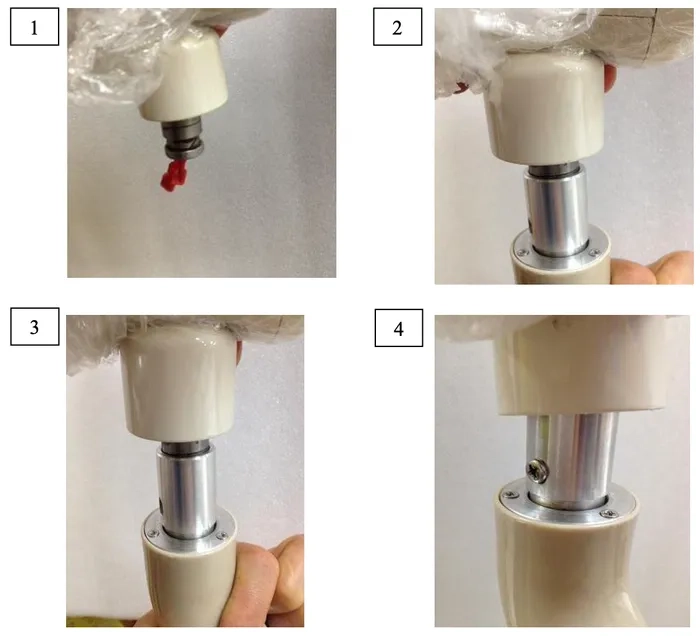
1. Insert the light head beauty ring into the light arm first before connecting the wires.
2. Connect the two wires from the light head to the light arm. See attached pictures.
3. Secure the light using the screw.
G.Comm Polaris LED and ISA Halogen Light Installation
Install the light head connector to the light arm. Secure the connector with the three set screws provided.
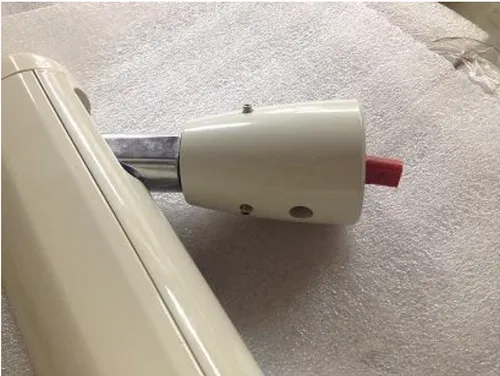
Attach the red optima connector from the light arm to the light head.
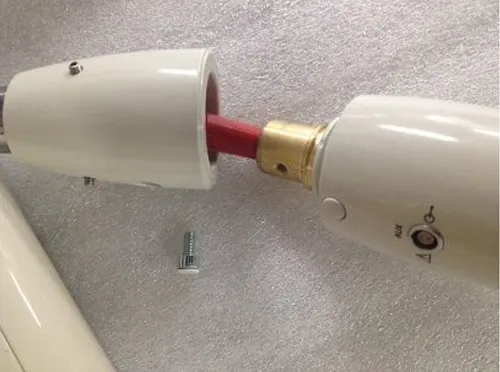
Secure the light head to the light arm using the Allen screw provided. Cover the Allen screw with the plastic cap.
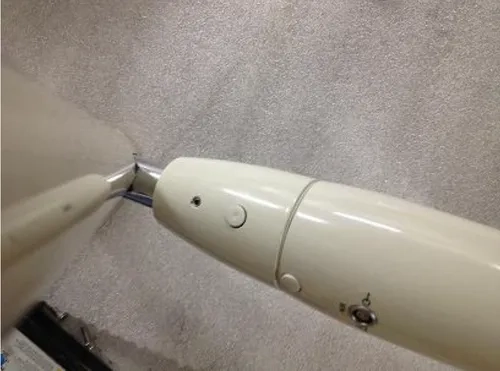
Install the light arm to the curved post. Check the tension of the light arm. (Refer to Adjusting the Tension of the Light Arm.)
Adjusting the Tension of the Light Arm
If the light arm is drifting downwards or if you are not able to maintain it at the desired position follow the steps below to adjust the tension on the light arm.
1. First unscrew the plastic cover at one end of the light flex arm.
2. After you remove the screw and plastic cover you can easily slide the metal casing off the flex arm.
3. You can now adjust the adjustment knob as shown in the picture below by turning it clockwise to tighten it, thus increasing tension/weight of the arm. You can loosen it by turning the adjustment knob counter-clockwise.
4. Once you have adjusted the flex arm to the desired tension replace the metal case and plastic cap to its original orientation.
As always if you have any questions about this process or anything else please feel free to contact us and take advantage of our “FREE TECH SUPPORT.”
We also offer FREE VIRTUAL TECH SUPPORT to “See and Talk” with a “Real Time Live Technician” for any problems you may be in need of help with.
You can also use our “FREE MAINTENANCE PROGRAM”. Take the guesswork and worrying about what unit is due for maintenance and which maintenance cycle it is time for. We will keep track of all your autoclaves and let you know when it’s time for anything.