What Are the Enbio Pro Error Codes?
Downtime in a busy medical or dental practice is never part of the plan. When an autoclave suddenly stops working mid-cycle, every minute spent trying to figure out what went wrong cuts directly into your clinic’s productivity and patient scheduling. With any advanced sterilizer, mastering how to diagnose and respond to unexpected errors is just as important as knowing how to run the machine in the first place. That operational insight is what separates a frustrating day from a quick, seamless fix.
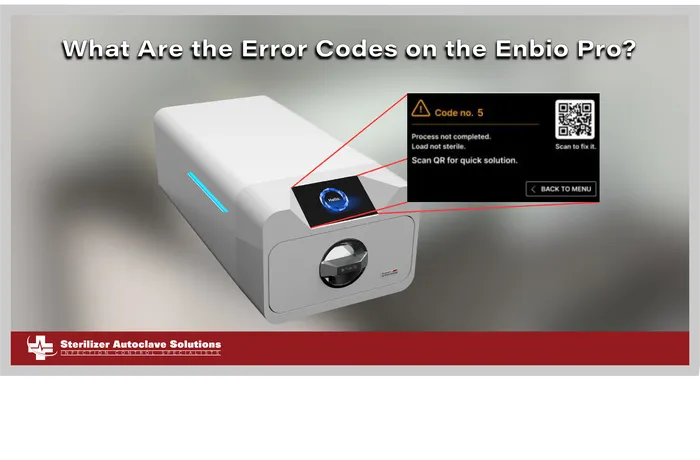
Fortunately, Sterilizer Autoclave Solutions is here to help you navigate the issues. Today, we are looking at the inner workings of the Enbio Pro to help you understand the various error codes that can occur during operation. Specifically, we will break down the Enbio Pro error codes by showing what each code means when it flashes on your screen, what underlying issue triggered it, and the steps you can take to quickly remedy the problem and get your practice back up and running.
Error Code 1 – “Chamber over temperature.”
Description:
Maximum temperature in the chamber exceeded.
Recommendations:
Contact our Free Tech Support Line at 704-966-1650 Option 3 for our technicians to assist you.
Error Code 2 – “Steam gen. over temperature”
Description:
Excessive steam generator temperature.
Recommendations:
- Too high weight of sterilized instruments – repeat the process with less instruments (max. 0.5 kg).
- Contact our Free Tech Support Line at 704-966-1650 Option 3 for our technicians to assist you.
Error Code 3 – “Process over temperature”
Description:
Excessive process temperature.
Recommendation:
Contact our Free Tech Support Line at 704-966-1650 Option 3 for our technicians to assist you.
Error Code 4 – “Overpressure error”
Description:
Pressure error
Recommendation:
Contact our Free Tech Support Line at 704-966-1650 Option 3 for our technicians to assist you.
Error Code 5 – “Sterilization pressure too low”
Description:
Pressure too low during sterilization.
Recommendation:
- Check that there is water in the bottle with the blue hose
- Correct the position of the blue hose so that the end is completely submerged in water. Add a sinker to eliminate the problem in the future.
- Check that the water supply hose (blue) is not damaged (After correcting the position / replacing the hose or refilling with water, restart the machine)
- Contact our Free Tech Support Line at 704-966-1650 Option 3 for our technicians to assist you.
Error Code 6 – “Sterilization temp. too low”
Description:
Sterilization temperature too low.
Recommendation:
- Check the water level in the bottle with the blue hose.
- Check that the red tube is not pointing up along its entire length, creating the so- called air trap.
- Contact our Free Tech Support Line at 704-966-1650 Option 3 for our technicians to assist you.
Error Code 7 – “Too high pressure during drying”
Description:
Pressure too high during drying.
Recommendation:
- Make sure the red drain hose is not immersed in water. The hose must not be kinked, the liquid must flow down by gravity.
- Check that the weight of the sterilized instruments is not too high.
- Contact our Free Tech Support Line at 704-966-1650 Option 3 for our technicians to assist you.
Error Code 8 – “Too many steam pulses / no water”
Description:
Too many steam impulses. No water supply.
Recommendation:
- Check the water connection to the “water in” connector.
- Check the distilled water level in the feed water tank (blue plug).
- Check that the weight of the load does not exceed the allowable weight.
- Contact our Free Tech Support Line at 704-966-1650 Option 3 for our technicians to assist you.
Error Code 9 – “Drainage error”
Description:
Drainage clogged
Recommendation:
- Check the level of the wastewater and the connection of the hoses.
- Check the level of the used water in the bottle with the red cap. If the bottle is full, discard the used water.
- Check that the red hose is not kinked and that it is pointing downward along its entire length.
- Check that there is no debris in the outlet opening (inside the chamber).
- Contact our Free Tech Support Line at 704-966-1650 Option 3 for our technicians to assist you.
Error Code 10 – “Chamber heating error”
Description:
Chamber heating error
Recommendation:
- Mains voltage too low – consult an electrician for the location where the autoclave is to be installed.
- Contact our Free Tech Support Line at 704-966-1650 Option 3 for our technicians to assist you.
Error Code 11 – “Steam generator heating error”
Description:
Steam generator error
Recommendation:
- Repeat the process.
- Contact our Free Tech Support Line at 704-966-1650 Option 3 for our technicians to assist you.
Error Code 12 – “Prevacuum fail / check outlet”
Description:
Vacuum pump / drainage error
Recommendation:
- Check the level of used water in the bottle with the red cap and pour out the excess.
- Check that the red hose is not submerged or kinked.
- Check that the autoclave setting provides free airflow for cooling the unit.
- The red hose must point downwards along its entire length, no section may point upwards.
- Clean the chamber door seal.
- Contact our Free Tech Support Line at 704-966-1650 Option 3 for our technicians to assist you.
Error Code 13 – “Power failure”
Description:
Momentary voltage loss during operation
Recommendation:
- Restart the device and make sure it is properly plugged into the outlet.
- Consult an electrician competent for the site where the autoclave is installed to check the installation.
Error Code 14 – “Pressure during standby”
Description:
Overpressure while waiting
Recommendation:
- Restart your device
- Contact our Free Tech Support Line at 704-966-1650 Option 3 for our technicians to assist you.
Error Code 15 – “Locking door error”
Description:
Door lock error
Recommendation:
- In an event that the Enbio S drawer gets stuck in LOCKED position, the emergency unlocking feature is located on the left side (from the front view) in the opening where LED light is shining through. It looks like a small hook. To release the door lock, pull trigger out until you hear a characteristic “click”. Restart your device. With Enbio PRO, we proceed in a similar way. Instead of a hook, there is a lever. Press it down and restart the device.
- Contact our Free Tech Support Line at 704-966-1650 Option 3 for our technicians to assist you.
Error Code 16 – “Unlocking door error”
Description:
Door unlock error
Recommendation:
Turn off the autoclave and turn it on again, start the process and stop it after a few seconds. There must be no overpressure in the chamber, i.e. the following information must be displayed: “READY / Chamber is safe to open.
Contact our Free Tech Support Line at 704-966-1650 Option 3 for our technicians to assist you.
Error Code 17 – “Valve V3 / HEPA filter error”
Description:
Valve V3 / HEPA filter error
Recommendation:
Replace the HEPA filter.
Contact our Free Tech Support Line at 704-966-1650 Option 3 for our technicians to assist you.
Error Code 18 – “Pressure sensor error”
Description:
Pressure sensor error
Recommendation:
Contact our Free Tech Support Line at 704-966-1650 Option 3 for our technicians to assist you.
Error Code 19- “USB disc error / Change disc”
Description:
Writing error on pendrive – damage to medium
Recommendation:
Copy the contents from your current flash drive – buy and install a new one.
Error Code 20 – “Min. Chamber temperature”
Description:
Chamber temperature too low during the process.
Recommendation:
Contact our Free Tech Support Line at 704-966-1650 Option 3 for our technicians to assist you.
Error Code 21 – “Chamber temperature sensor failure”
Description:
Chamber temperature sensor failure.
Recommendation:
Contact our Free Tech Support Line at 704-966-1650 Option 3 for our technicians to assist you.
Error Code 22 – “Steam gen. Temp. Sensor failure”
Description:
Steam generator temperature sensor failure.
Recommendation:
Contact our Free Tech Support Line at 704-966-1650 Option 3 for our technicians to assist you.
Error Code 23 – “Process temp. Sensor failure”
Description:
Process temperature sensor failure.
Recommendation:
Contact our Free Tech Support Line at 704-966-1650 Option 3 for our technicians to assist you.
Error Code 23 – “Process temp. Sensor failure”
Description:
Process temperature sensor failure.
Recommendation:
Contact our Free Tech Support Line at 704-966-1650 Option 3 for our technicians to assist you.
Error Code 24 – “Autoclave has too low temperature”
Description:
Autoclave temperature too low / temperature sensor error.
Recommendation:
Leave the device switched off for 3 hours at room temperature.
Contact our Free Tech Support Line at 704-966-1650 Option 3 for our technicians to assist you.
Error Code 31 – “Internal flash error”
Description:
Internal memory error.
Recommendation:
Contact our Free Tech Support Line at 704-966-1650 Option 3 for our technicians to assist you.
As always if you have any questions about this process or anything else please feel free to contact us and take advantage of our “FREE TECH SUPPORT.”
We also offer FREE VIRTUAL TECH SUPPORT to “See and Talk” with a “Real Time Live Technician” for any problems you may be in need of help with.
You can also use our “FREE MAINTENANCE PROGRAM”. Take the guesswork and worrying about what unit is due for maintenance and which maintenance cycle it is time for. We will keep track of all your autoclaves and let you know when it’s time for anything.
If you want to read more info on the Enbio Pro, you can find it on our site here.
We also have the Enbio Pro User Manual available on our site here for reading or download.