

CPAC RH-Pro9 Maintenance Guide
Here at Sterilizer Autoclave Solutions, we always continue to highlight the core elements of the ownership process: installation, operation and maintenance. Which is why we have a large library of resources and guides for anyone to access to help them through these processes.
In this article, we’d like to focus on a guide for one autoclave in particular. A High-Velocity Hot Air sterilizer from CPAC, their RH-Pro9. HVHA sterilizers are much different than your typical steam sterilization, and because of that, they sometimes fall to the wayside. But the RH-Pro9 helped CPAC to bring the HVHA into the modern autoclave market. Here, we’re going to look at the maintenance guide for the CPAC RH-Pro9, to ensure maintenance is performed with the right resources and equipment where necessary.
If you have any questions about the CPAC RH-Pro9, autoclaves or anything else, give us a call at 704-966-1650 Option 3 for our Free Tech Support Line. Our technicians will help you with any questions you have about your ultrasonic cleaners.
MAINTENANCE
The RH-Pro9/RH-Pro11 Sterilizer is constructed of high-quality materials, which may be cleaned with mild soap and a damp cloth or any non-abrasive cleaner. Unit can be externally disinfected with a non-bleach disinfectant (preferably quaternary ammonium compound (e.g., Lysol).
At the beginning of each day, check seal around door to ensure it is clean and free of obstructions.
A cooling fan filter is located on the back of the unit to ensure the sterilizer performs reliably for many years. Visually inspect the filter for buildup of dust or contaminants at least once a month. Replace or clean (by rinsing preferably with distilled water and dry) the filter if an excessive amount of dust is evident. Replacement foam filters may be purchased from CPAC Equipment.
All internal components used in the sterilizer’s construction are longlife, heavy-duty parts that require no maintenance.
CYCLE DOCUMENTATION, DATA STORAGE AND RETRIEVAL
RH-Pro9/RH-Pro11 Sterilizer is not designed or capable of Internet/ Intranet connectivity, only providing output communication of cycle data to a USB flash drive of 16 Gb or less.
Data Storage
RH-Pro9/RH-Pro11 Sterilizer is capable of downloading cycle data to a Point–Of – Sale (POS) printer or USB flash drive of 16 Gb or less. The flash drive should be inserted in the USB port located on the lower front side of the sterilizer. While the RH-Pro9/RH-Pro11 USB jack can provide power for operation of USB memory devices, its design load limit is 200 mA, about 1/10 the output power of a typical USB wall-pluggable charger. The RH-Pro9/RH-Pro11 USB jack is not intended for use in recharging USB-connectable devices such as cell phones. The sterilizer will record cycle parameters, including start date and time, cycle phase time and temperatures, and the cycle status. The cycle status at the end of the record will indicate details of the completed sterilization cycle.
The flash drive can be any type formatted for FAT (FAT16) or FAT32. FAT32 is the recording format that is most commonly found in these devices. Although the internal memory of the RHPro9/RH-Pro11 can store data for up to 100,000 sterilization cycles, it is recommended that data be downloaded via the USB flash drive daily or weekly and stored on a personal computer or office share drive for easy retrieval, or for printing along with data from the biological and chemical indicator tests.
Time-Date Setting
The date and time should be set in the sterilizer so that information in the data log is correct as to time. These settings should be performed before the RH-Pro9/RHPro11 Sterilizer is first used and will need to be updated if the power to the sterilizer is lost for an extended period. Power backup for short power interruptions is provided as part of the timekeeping function. Follow the instructions in the Operation Guide, “Set Time and Date” to adjust the time settings. The calendar does not handle Leap Year automatically. The clock does not perform Daylight/Standard time changes automatically.
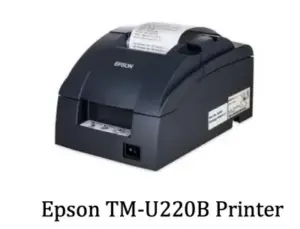
Printer If direct printing is desired, the RH-Pro9/RH-Pro11 has been designed to operate with an Epson TM-U220B having a USB interface and connected by a USB cable. The printer must be connected to the RH-Pro9/RH-Pro11 USB port, and it must be turned ON, for the printer output to work.
As always if you have any questions about this process or anything else please feel free to contact us and take advantage of our “FREE TECH SUPPORT.”
We also offer FREE VIRTUAL TECH SUPPORT to “See and Talk” with a “Real Time Live Technician” for any problems you may be in need of help with.
You can also use our “FREE MAINTENANCE PROGRAM”. Take the guesswork and worrying about what unit is due for maintenance and which maintenance cycle it is time for. We will keep track of all your autoclaves and let you know when it’s time for anything.
If you want to read more info on the CPAC RH-Pro9, you can find it on our site here.
You can read the CPAC RH-Pro9 Installation Guide on our site here.
You can read the CPAC RH-Pro9 Operation Guide on our site here.